Paper Brush: A Display Font with Character
There’s something about the right font that can transform a layout from ordinary to unforgettable. I recently found myself in just such a moment—sitting at my desk, staring at a blank canvas for a lifestyle blog redesign. The goal was simple: find a typeface that would carry the tone of warmth and creativity without overwhelming the reader. That’s when I discovered Paper Brush, a display font with a unique rhythm and personality that felt like it had been waiting for this exact moment.
A Visual Rhythm Worth Noting
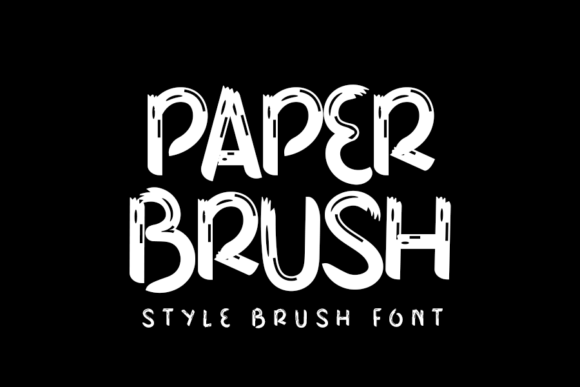
Paper Brush is a bulky display font, but its bulk feels intentional. It has a softness to it, almost like tracing your fingers over the texture of paper itself. Each letter carries a gentle curve or a subtle stroke that adds depth without complexity. This gives it a visual rhythm that feels both modern and approachable, making it ideal for editorial projects that want to stand out without shouting.
The font’s character is warm and inviting, which makes it especially well-suited for lifestyle content, recipe guides, and creative workbooks. When used as a headline or section opener, it commands attention without demanding too much from the reader’s eye. Its boldness is balanced by a quiet elegance that speaks volumes in design.
Real-World Use in Editorial Layouts
I tested Paper Brush in several real-world editorial scenarios, and each time, it performed with grace. For a digital magazine layout, I used it as the main title font across multiple feature pages. It worked beautifully, creating a consistent identity while allowing room for other fonts to support the content. Pairing it with a clean sans serif font for body copy gave the piece a professional yet friendly feel.
In a coaching workbook I was designing, Paper Brush made an excellent choice for chapter openers and pull quotes. It added a sense of importance to key messages without disrupting the flow of the text. Even in a newsletter header, where clarity and brevity are essential, the font managed to be both eye-catching and readable.
However, it’s important to note that Paper Brush isn’t meant for long-form reading or dense paragraphs. Its expressive nature works best in short bursts—titles, subtitles, decorative accents, and section headings. For body copy, it’s best paired with a more legible font to maintain readability and avoid fatigue.
Readability Across Media
When considering Paper Brush for any project, it’s essential to think about how it will perform across different media. On screen, its curves and strokes render smoothly, even at smaller sizes. Mobile layouts benefit from its clean lines, ensuring that it remains legible on smaller screens without losing its character.
In print, the font maintains its visual appeal, especially in high-quality PDF exports or printed materials. However, for formal reports or dense academic texts, it might not be the most suitable option due to its expressive style. Instead, it shines in creative contexts where mood and brand identity take precedence over strict typographic rules.
Pairing and Practical Considerations
Font pairing is a crucial aspect of editorial design, and Paper Brush offers great flexibility. For instance, pairing it with a traditional serif font like Garamond or Caslon can create a timeless, elegant look that works well for literary publications or wedding guides. For a more modern feel, combining it with a clean sans serif like Helvetica Neue or Arial can give a fresh, contemporary edge to a digital magazine or course PDF.
Before using Paper Brush in any commercial project, it’s wise to check the included styles, alternates, ligatures, weights, and multilingual support. Ensuring that the font meets your needs in terms of file formats and licensing is also important, especially if you plan to use it in ebooks, templates, or client-facing materials.
Ultimately, Paper Brush is a versatile and thoughtful display font that brings character to any editorial layout. Whether you're redesigning a blog header, crafting a printable planner, or building a course PDF, it offers a unique way to elevate your content with a touch of personality and style.